Identify which layer failed
| Visible symptom | First distinction | Next check |
|---|---|---|
| Progress stops at a named resource | Transfer vs scene initialization | Compare progress and error; record observation window |
| Folder / archive required | Demo vs owned-data route | Read the project’s exact package and hierarchy |
| Black scene with an explicit renderer error | Graphics vs unfinished resources | Record error and current runtime requirements |
| Certificate / HTTP host error | Main host vs one asset | Save URL, time and exact response |
| Scene works but input does not | Menu / console / focus vs gameplay | Use the documented control on the active scene |
| Save seems missing | Route / profile / storage vs host availability | Protect existing data before reset |
Three recorded failure mechanisms
These are dated observations, not a claim that a host is still failing for everyone. Each record states the available environment; missing fields remain unknown.
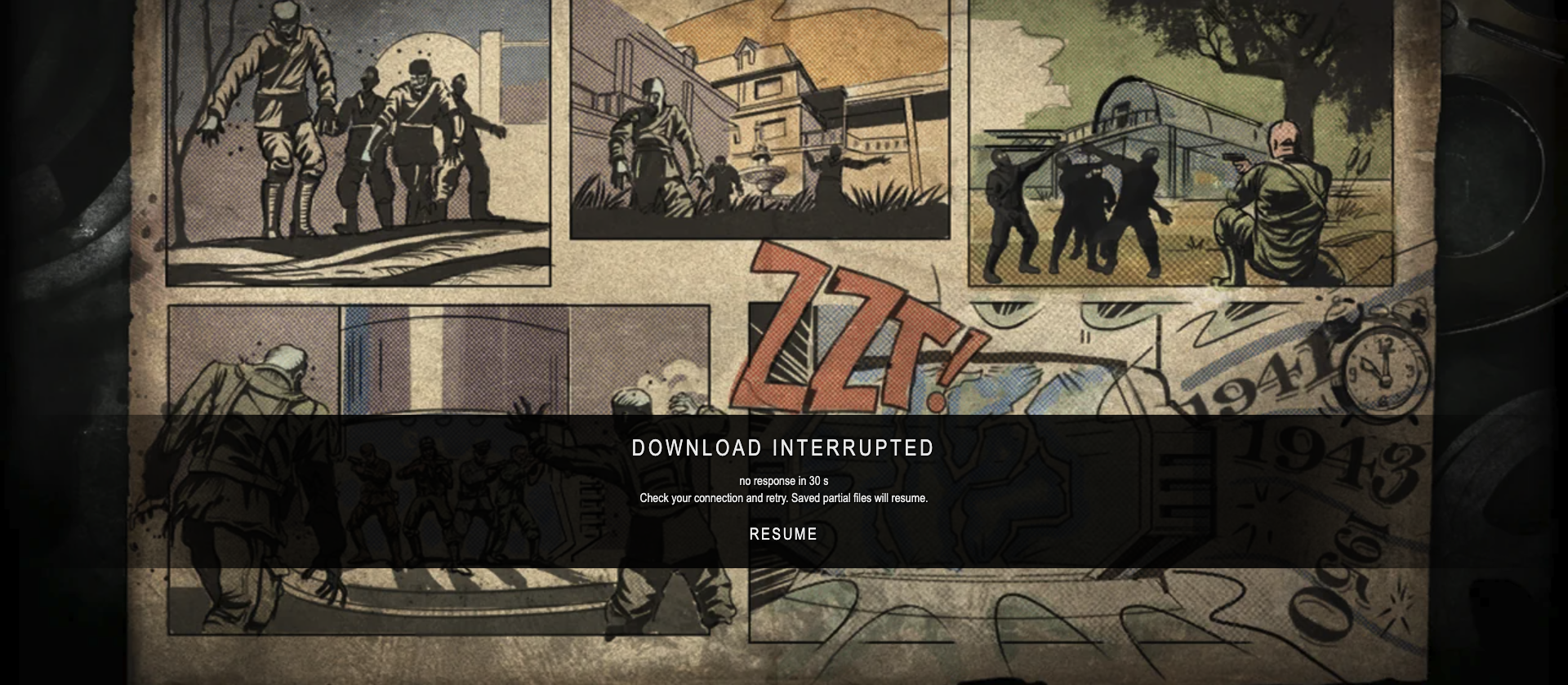
BO1 Moon: resource transfer stopped
October 10, 2026 (historical check; exact time not retained) · Desktop browser; precise OS/browser version not retained · Resource transfer interruption
Recorded Moon host route ↗ · Project source ↗
Raw result: DOWNLOAD INTERRUPTED / no response in 30 s
The earlier Moon record noted a 404.4 MB resource and 16% progress, followed by the host’s interruption message. No controllable scene appeared.
The archived interruption screenshot retains the exact host message. The 30-second window belongs to this loader observation; it is not a universal game timeout.
Conclusion: Transfer did not reach gameplay in this record. The message suggests retrying, but no root cause or successful resume was established; the screenshot does not verify save persistence.
WebWars: certificate hostname mismatch
October 10, 2026 (current curl check; exact time not retained) · macOS 26.4.1; curl TLS check; no browser gameplay · TLS certificate validation failure
Reported WebWars host ↗ · Project source ↗
Raw result: curl: (60) SSL: no alternative certificate subject name matches target host name 'webwars.link'
Requested the reported host with normal certificate verification. curl refused to establish the secure connection because the certificate did not match the hostname.
No certificate bypass was used. The failed connection provides no information about gameplay, input or GPU speed.
Conclusion: This is a host/certificate problem in the checked connection. Consult the author’s current entry and wait for a valid host; do not ignore the certificate warning.
Historical playgta5.com candidate: HTTP 522
2026-10-09T16:30:02.205849+00:00 (October 10 in Asia/Shanghai) · HTTP curl check; OS/browser/device not retained · HTTP host response error
Historical unconfirmed candidate; not a Play entry ↗
Raw result: HTTP 522 / error code: 522
The original HTTP record retained this timestamp, final URL and status 522. It produced an error response rather than a game interface.
No primary GTA V browser project, playable scene or input was established. This historical result is not a new availability check.
Conclusion: The candidate host failed in the dated record. It cannot establish browser access to GTA V or identify a local graphics fault.
Download stops or keeps loading
A browser route may avoid a native installer while still transferring engine code, music and game data. Watch two observations of the progress indicator and the named resource, rather than deciding from a single screenshot.
The BO1 loader reported no response in 30 seconds. Other projects can have different loading behavior; do not turn this one observation into a blanket timeout rule.
- Record the project URL, selected demo/map and current progress or resource name.
- Check whether the main host works and whether a specific resource reports an error. Distinguish an HTTP error from progress that simply has not changed.
- Use the project’s documented retry/resume action if available; record its outcome. Do not infer a successful resume or saved progress from the button label.
The project asks for game files
First check whether you chose a built-in demo or an owned-data engine route. Diabloweb shareware uses spawn.mpq; its full game needs your own DIABDAT.MPQ. NetQuake separates shareware from extra episodes using your own pak1.pak. WebXash Uplink is distinct from importing a root containing valve or a correctly structured ZIP.
Read the author’s file and directory requirements. This website hosts no commercial game packages, does not receive your archives and does not grant a license to redistribute them. An open engine is not a license to the original game assets.
The page loads, but the game scene is black
A black scene may accompany unfinished loading, explicit renderer errors or another failure. Record the actual error before changing browser or GPU settings. A missing-model message describes a data/asset issue; it should not automatically be called a graphics-driver failure.
Version matters. NetQuake’s older README describes WebGL, while our current host check visibly reported WebGPU. That difference means generic instructions for one engine version may not apply to another. Follow the current project’s documented requirements; we do not promise that enabling a single switch repairs the game.
In our WebXash Uplink check, missing-model warnings preceded a rendered corridor and reappeared when a save loaded. That limited success does not establish every asset or later scene.
The scene appears, but controls do not respond
A running attract demonstration, an open menu or a console can consume input without controlling your own game. Start the documented new-session route and click the loaded scene before testing an input.
We checked click-to-move in Diablo town and W in Quake Introduction and Half-Life Uplink. Those controls are project-specific. We do not apply one game’s binding to every browser port. Compare the actual scene before and after input; a dispatched key alone does not prove it worked.
Before resetting browser data
Before any browser reset, distinguish a host failure from local storage, a changed route, a different browser profile or an unselected game/mod. Clearing cookies or website storage may remove progress. Do not make it the first response to a certificate or host error.
Our three guide checks restored one save after closing and reopening a tab in the same browser profile. They did not test a full browser restart, storage deletion, another device, export/import or disaster recovery. Do not assume every reset can be undone.
If the project offers an export/download manager, follow its documented backup instructions and verify your backup before deleting anything. We did not exercise export/import here. Keep licensed game data and private paths out of public bug reports.
What to include in a project bug report
Report to the project’s documented issue tracker, not an advertising button. Include the public host URL, demo or owned-data route, check time and time zone, OS, browser version, device/input method, exact error and the last visible progress. Say whether the menu, scene and input each worked. Share a screenshot only after removing personal details. Do not attach credentials, account information, commercial game archives or private filesystem paths.
Sources and evidence limits
The download case uses the archived October 10 check. The certificate case was repeated with curl without bypassing TLS validation. The 522 record is an HTTP check of an unconfirmed historical candidate, not a verified GTA V game project.